



Fio’s been busy lately, and the K13 R2R is the latest thing to land on my desk. At $320, this is FIO’s fully differential, true 24-bit R2R DAC and headphone amp, and it’s a pretty interesting one to dig into.
I have been putting it through its paces on my desk for the past couple of weeks, and I have to say it is one of the more fun and musical desktop units FiiO has released in a while. Instead of chasing ultra-clinical measurements, they went with a resistor ladder design that aims for a more natural, analog-like presentation. Tested at $319 USD.
Disclaimer: This sample was provided by FiiO for an honest review. All observations and opinions here are my own, based on my experience with the product.
FiiO K13 R2R

What’s On Board
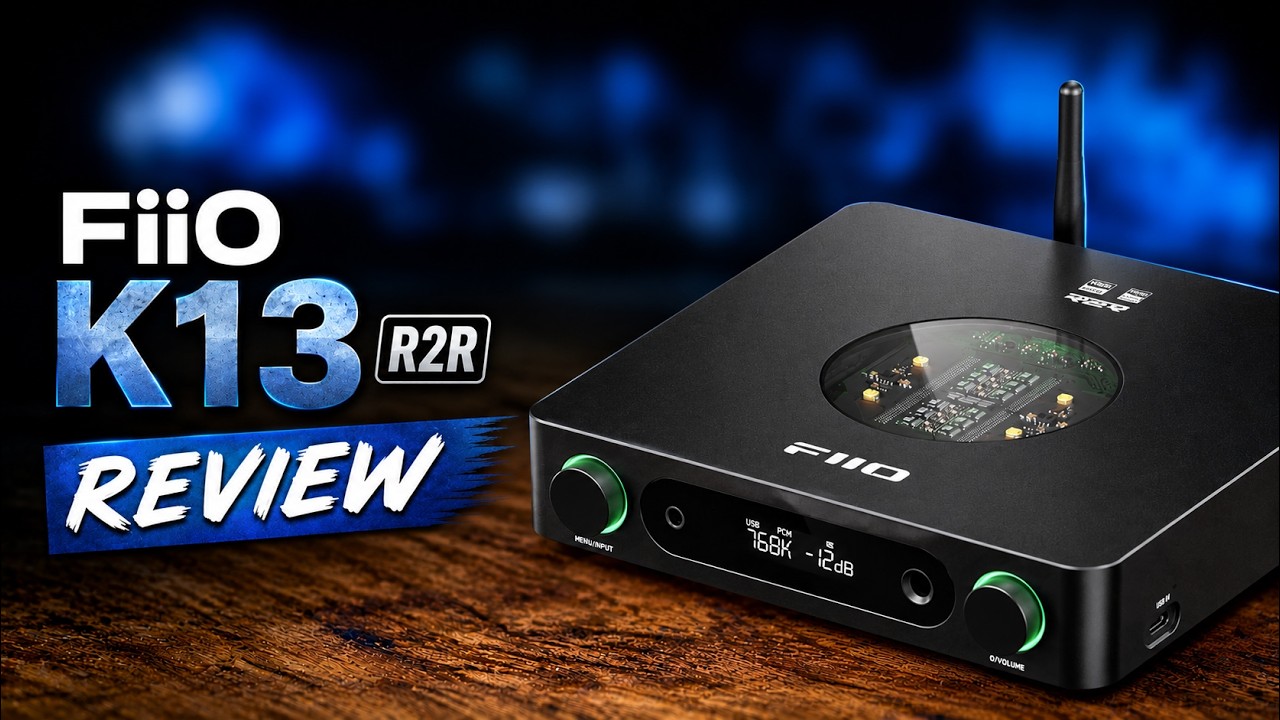
The headline feature is right there under the window on top of the unit: FIO’s R2R resistor ladder arrays, on full display. I won’t get into the weeds on how R2R differs from the more common Sigma Delta DAC design (there’s plenty of that online already), but the short version is that R2R ladder DACs tend to have a reputation for a richer, more musical, more analog sound. More on whether that holds up later.
Functionally, this thing does double duty as a preamp and a power amp, so you can run it with either a fixed line output or a variable one. Spec-wise it’ll handle PCM up to 384kHz/32-bit and DSD256, which isn’t going to top any spec sheets these days, but honestly, your ears aren’t going to notice the difference at this point.
Where FIO really shows its hand is the parametric EQ. If you know FIO, you know they’re putting PEQ on basically everything now, and the K13 R2R is no exception. You can dig into it either through the unit itself or through a web interface, and there’s a stack of EQ presets (retro being one) alongside the option to build your own custom curves from scratch. You can also export, import, and share EQ profiles with other users, which is a genuinely nice touch.
There’s also NOS and OS modes on offer, non-oversampled and oversampled. I tried both and landed slightly on the side of NOS, just because it gives things a touch more analog character. It takes some of the digital edge off, which isn’t really needed with a lot of older recordings, but with cleaner, more modern digital masters, NOS mode loosens things up nicely and adds some warmth.

Build and Layout
Up top you’ve got that R2R array on display. The front panel houses a multi-function dial for menu navigation, a 4.4mm balanced output capable of pushing out up to 2.4 watts (2400mW, which is a genuinely huge amount of power), and a 6.35mm single-ended output alongside it. There’s a clicky, detented volume knob and a small display.

There are two USB inputs, one on the side and one round the back, purely so you can plug in wherever’s most convenient depending on your setup. Around the back, from left to right, you get balanced XLR outs, single-ended RCA line outs, and then USB, coaxial, optical, and high-res Bluetooth for inputs. There’s also a power select switch so you can toggle between the internal AC supply or an external DC one.
The top and front LEDs are adjustable for brightness, and you can change their color through the FIO Control app on your phone. They’ll also shift color automatically depending on the sample or bit rate you’re currently playing, so DSD triggers a different color to standard PCM (white, from what I could tell).
I’ll be honest, the display itself is a bit plain. It’s utilitarian, maybe a little boring. Some people won’t mind that at all, but I do like a bigger, punchier display, and the recent Topping DX1 M is the one that comes to mind as doing this well. Some of the info displayed above the volume readout is also genuinely hard to read from any kind of distance, so it loses some usefulness there. Not really a con so much as a personal preference, but worth flagging.
One feature I was really happy to see is an auto standby mode, adjustable from off up to 30 minutes. If there’s no signal coming into the unit it’ll power down on its own, which is great for someone like me who is far too prone to leaving a DAC running for hours after I’ve left the room. Small thing, but it matters.

It comes with a remote too, which I didn’t personally need since the unit stayed on my desk the whole time, but if you’re running this in a living room setup it’ll come in handy. And a small detail I appreciated: the rounded corners on the chassis. I’m not a fan of units with hard, sharp edges, and FIO’s softened this one up nicely.
Sound
Onto the part a lot of you are here for. The K13 R2R does lean into that slightly more analog presentation, especially with NOS mode engaged, and it’s a noticeable if subtle shift. If you want maximum resolution, particularly up in the treble, you’ll want oversampled mode instead, but for pure musicality, NOS is the way to go.
That analog lean does come with a trade-off though. Resolution isn’t quite up there with some other DACs. I put it side by side with my DNA Alpha Pro and the gap was pretty clear, with the Alpha Pro pulling ahead on detail retrieval and overall resolution. That said, the Alpha Pro also costs roughly double, so context matters here.
What you’re getting instead is a warmer presentation, softer note transients, and a soundstage that’s good without being the largest I’ve heard. Dynamics were genuinely strong across the board, handling quiet, delicate passages just as well as the big crescendos. I ran a handful of sensitive IEMs and full-size headphones through it and everything sounded clean, with zero audible background noise and more than enough power on tap for whatever I plugged in. Even the HD 650s, which aren’t the easiest load, drove with no issues at all, with bass that stayed tight, controlled, and punchy thanks to all that available power.
I’m not going to pretend I can give you some exhaustive breakdown of every frequency here. It’s a DAC, it does what DACs do: takes a digital signal and turns it into an audio one. And it’s a good-sounding one. But honestly, what impresses me most about the K13 R2R isn’t the sound signature at all, it’s the sheer amount of functionality packed in. The LED customization, the auto standby, the sleep mode, the flexibility of ins and outs, all of it adds up. I could run this purely as a DAC and feed the signal out to something like my Burson Soloist GT4, and it would handle that job just as easily as running standalone.

Final Word
Like most FIO gear these days, the K13 R2R punches above its roughly $300 price tag in terms of value. If you’re after a desktop hub or all-in-one unit that covers a ton of bases without breaking the bank, this one deserves a spot on your shortlist.